
For older people managing their own medicines
What to take today,
and where to be next.
DaySheet opens on the tablets to take this morning, or from midday this evening, with the next appointment underneath. Behind four big buttons sit your medicines with a photo of each box, your appointments, your doctors and your family, plus a one-page summary to show the doctor. Big text, plain words and a Home button on every screen. Nothing is stored anywhere but your own phone.
A one-off A$5. Not medical advice: always follow your doctor and pharmacist.
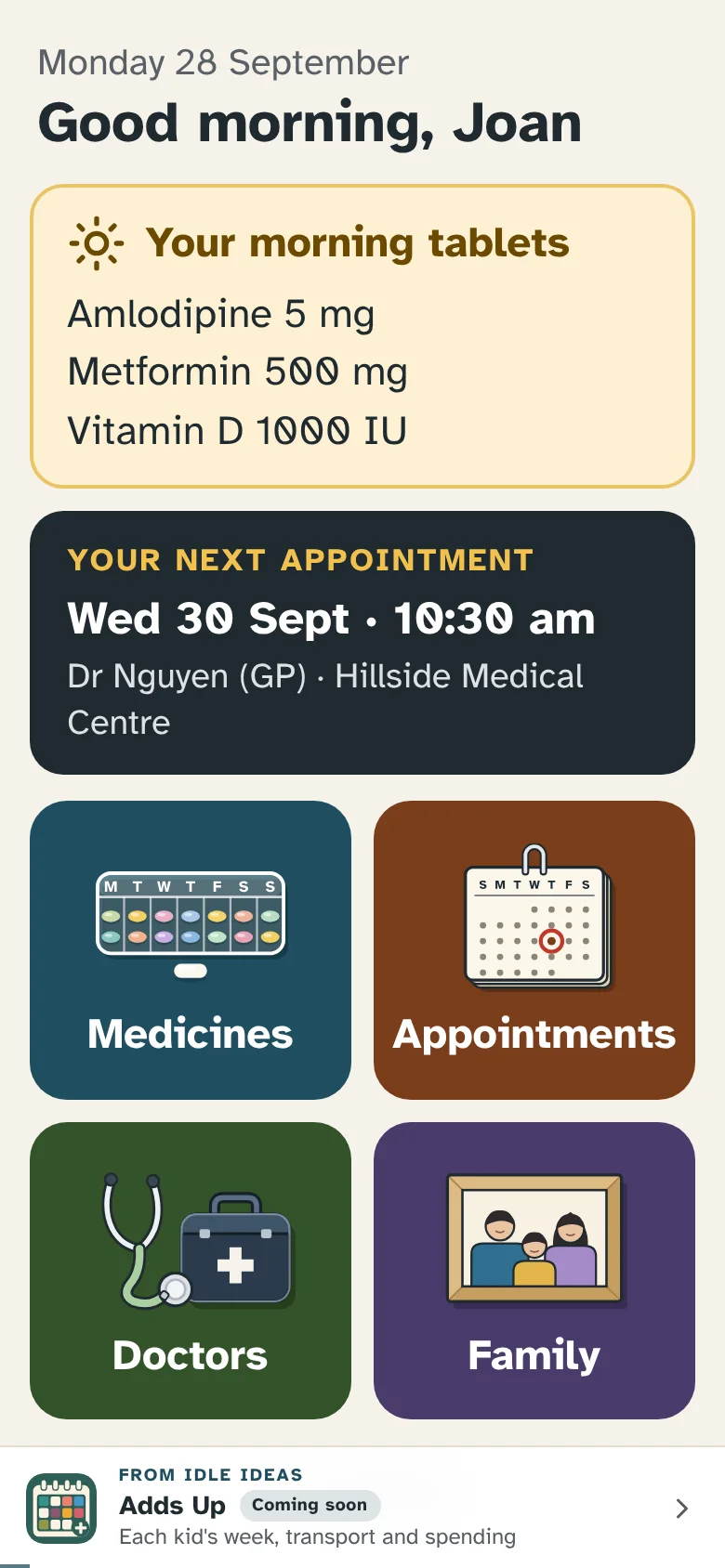
- Today's tablets on the home screen: morning until midday, evening after.
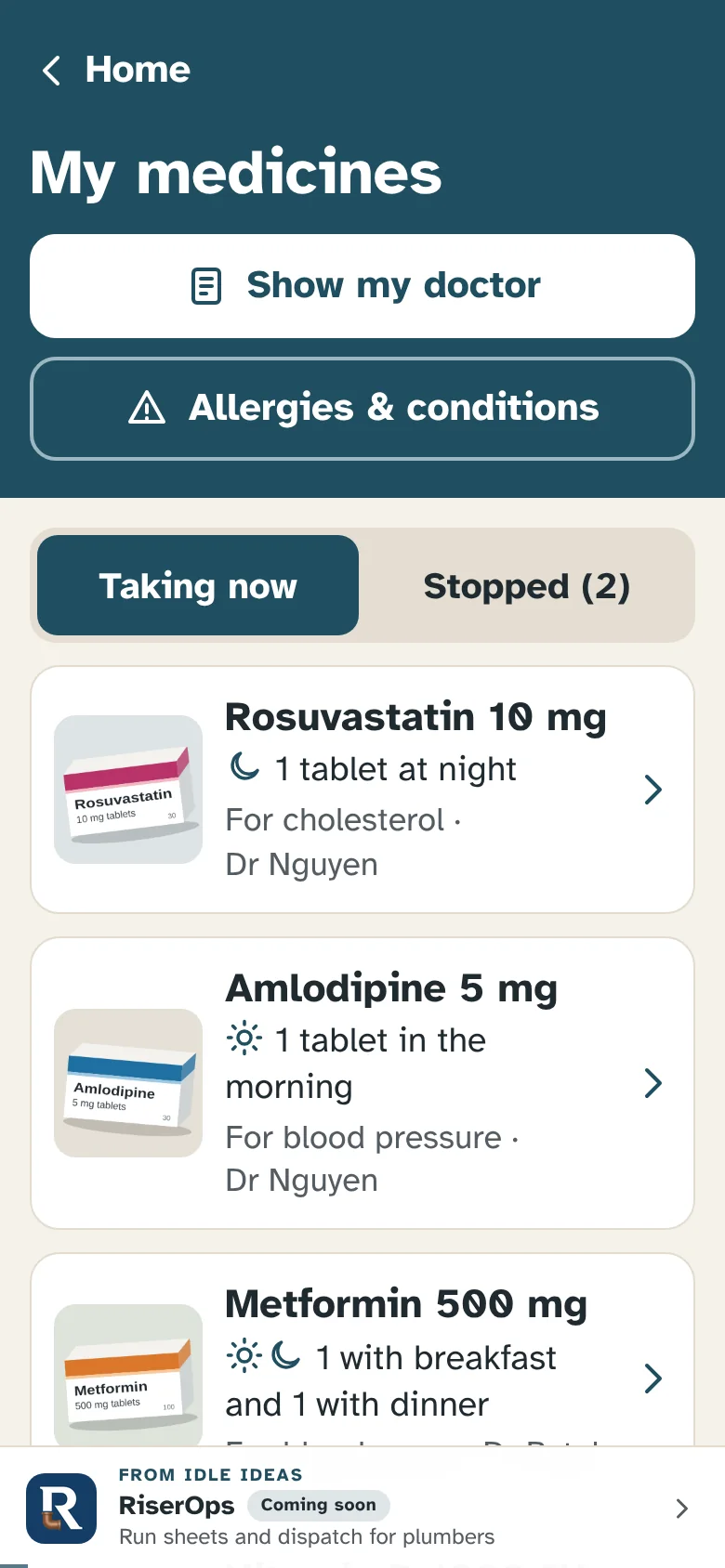
- Every medicine with a photo of the box, and why any were stopped.
- The next appointment up front, and what the doctor said afterwards.
- A one-page summary for the doctor, on screen or printed on A4.
- Doctors, the pharmacy and family, each with a big Call button.
- Big text and plain words. Everything stays on your phone.
What it does
The things that usually live in a kitchen drawer, on the fridge door and in your head.
-
The day's tablets, up front
Before midday the home screen lists this morning's tablets, and from midday this evening's. It works that out from when you said you take each one.
-
A photo of every box
Take a photo of the packet when you add a medicine, and tap it to see it full screen. Handy when a brand looks different at the chemist.
-
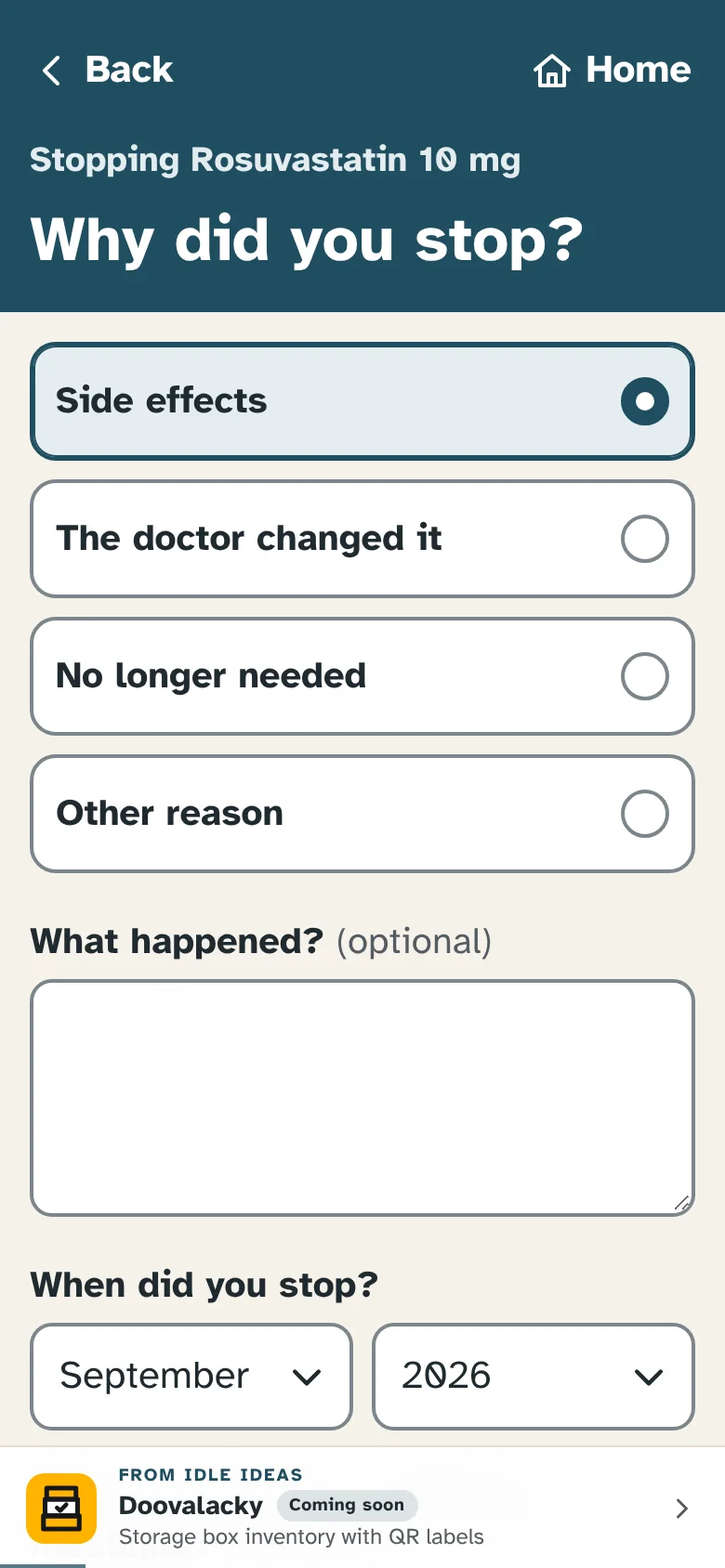
Stopped, and why
Stopping a medicine asks why, with quick picks like side effects or the doctor changed it, plus the month and what it was swapped to. The doctor sees the history, not just today's list.
-
Show my doctor
Allergies first, then conditions, current and stopped medicines, doctors and emergency contacts, on one page. Show it on the screen, print it on A4 or save it as a PDF.
-
Appointments, with what the doctor said
The next one sits on the home screen, and the list keeps what to bring. Afterwards, add what the doctor said, so it's there to look back on.
-
Big and plain by design
Text never smaller than 17 pixels, buttons at least 52 pixels tall, plain words and a Home button on every screen. It copes with a phone set to very large text, and the phone's Back button does what you'd expect.
A look inside
Real screens from DaySheet. Every person, doctor and phone number on them is made up, and so is the list of medicines.
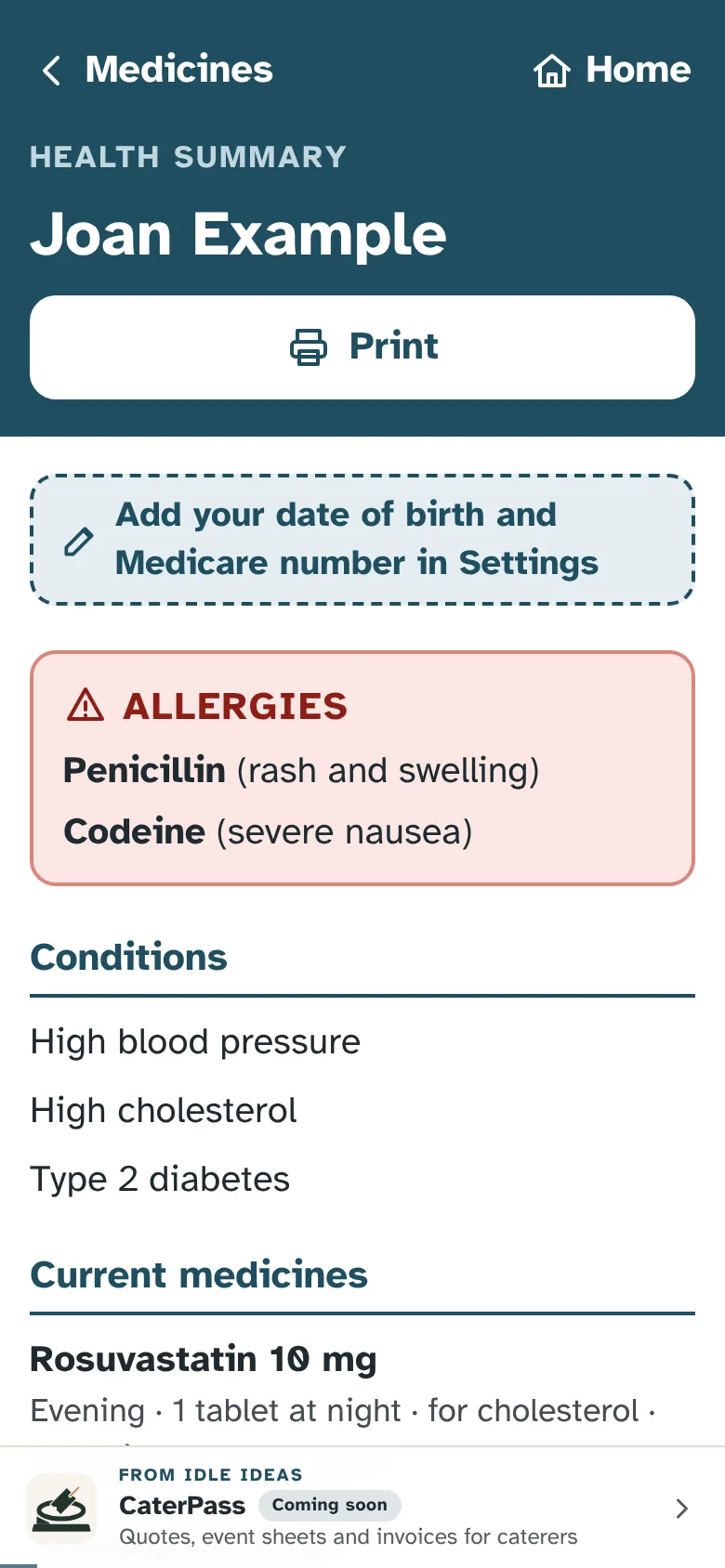
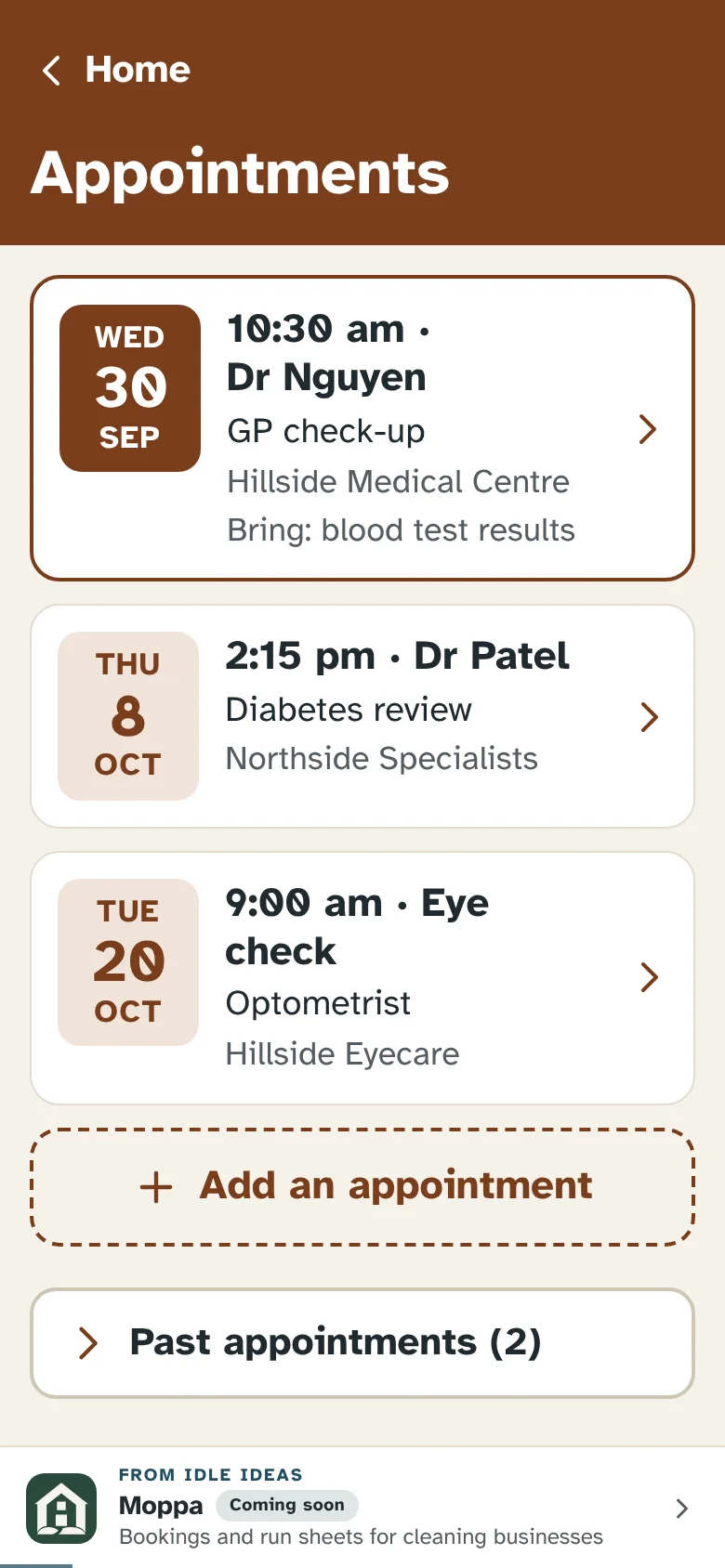
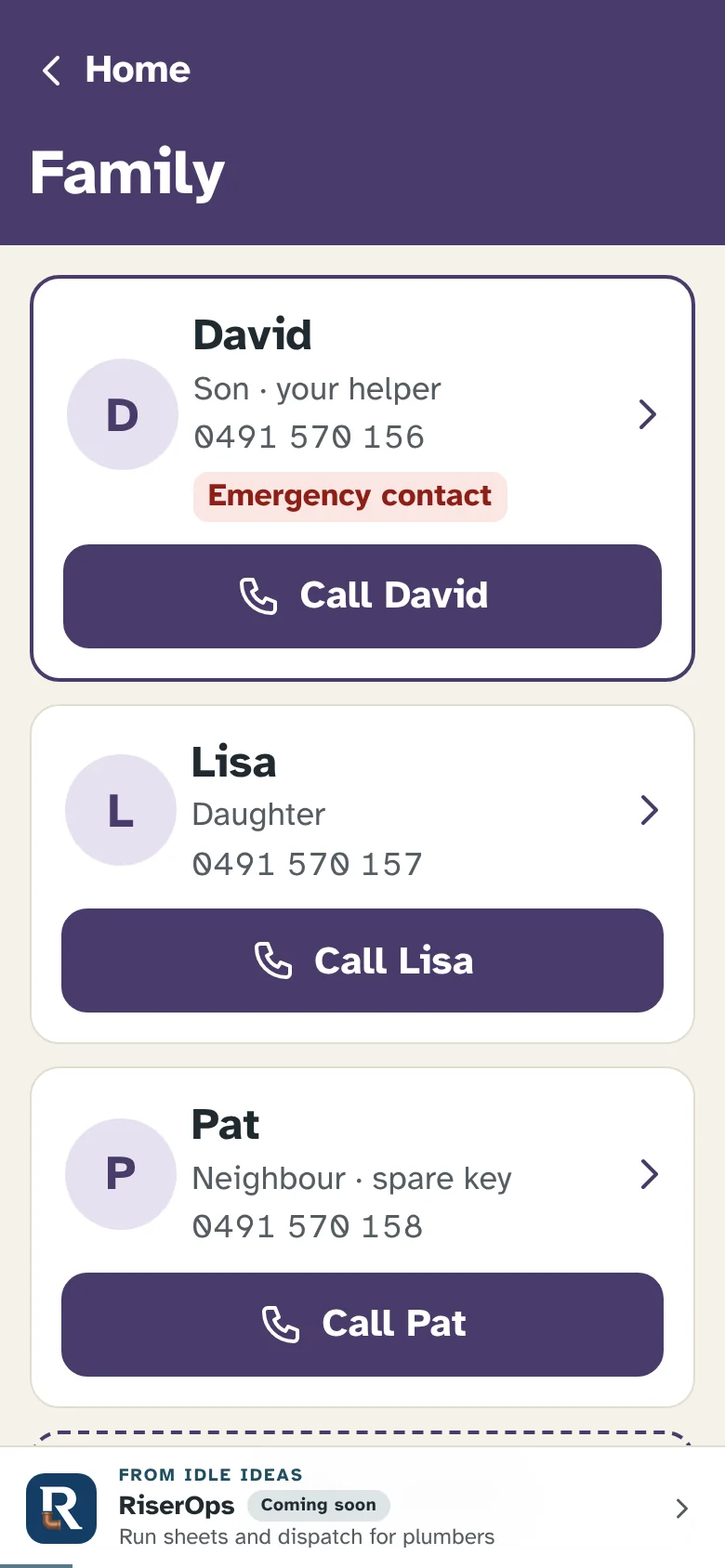
How it works
Add your medicines
Name, strength and when you take it, and a photo of the box if you like. That's enough to start.
Look at the home screen
Each morning it shows the morning tablets, and from midday the evening ones, with your next appointment underneath.
Keep it up to date
When a medicine stops, say why. After an appointment, add what the doctor said.
Show the doctor
Tap Show my doctor for one page with everything that matters. Show the screen, or print it.
Pricing
A one-off A$5 when it opens more widely. Nothing to pay while it's in private testing.
When it opens
A$5 once
One payment, with nothing to renew. Your details stay on your phone and a backup file is always yours to keep.
Right now
Private testing nothing to pay
One family is using it while it's refined. Register your interest to hear when it opens more widely.
Where your data lives
- Medicines, appointments, doctors and family are stored in the web browser on your own phone
- Photos of medicine boxes stay on the phone too, never uploaded
- There is no account, no database and no sign-in
- Even the fonts come from DaySheet's own site, so it makes no calls to anyone else
- A backup file you keep wherever you like, such as in an email to family
What it isn't
- Medical advice. Always follow your doctor and pharmacist.
- A reminder alarm. It doesn't send alerts or ring at tablet time.
- A prescriptions or repeats tracker. Your chemist's app already does that.
- A cloud service. Nothing syncs between devices; move data with a backup file.
Put it on your phone
DaySheet is a web app that installs like a normal app. No app store needed. During private testing it asks for a password the first time on each device.
iPhone or iPad
- Open DaySheet in Safari.
- Tap the Share button.
- Choose Add to Home Screen, then Add.
Android
- Open DaySheet in Chrome.
- Tap the three-dot menu.
- Choose Add to Home screen or Install app.
Help sheets
Step-by-step sheets with a picture for every step. Print them, or keep them on the phone.
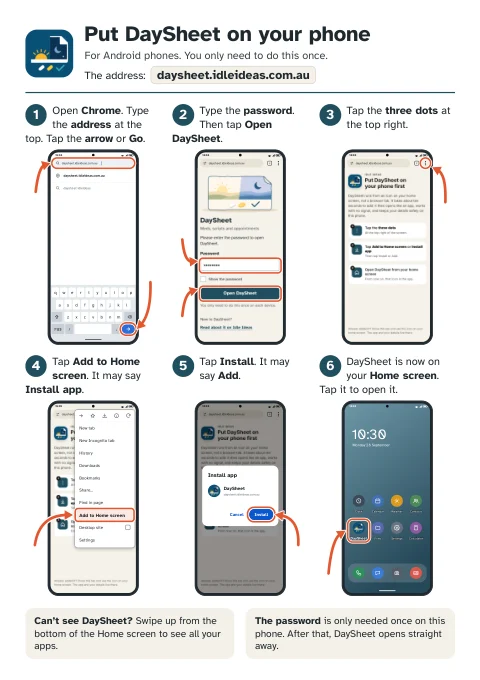
Put DaySheet on your phone
Six steps for Android, then six for iPhone and iPad, from opening the browser to DaySheet's icon on the Home screen.
Open the sheetPDF, two A4 pages, 490 KB.
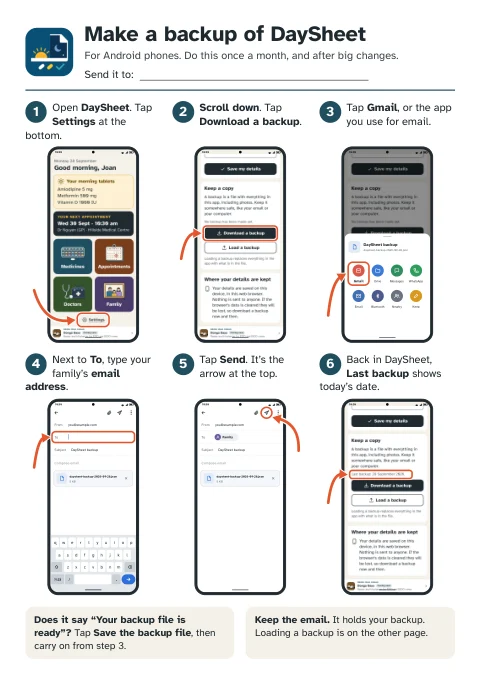
Backups: make one, load one
Page one emails a backup to family. Page two puts it back, on the same phone or a new one.
Open the sheetsPDF, two A4 pages, 870 KB.
Questions
Who is DaySheet for?
Anyone who looks after their own medicines and appointments and would rather have big, plain screens. It was made with people in their 60s to 80s in mind, and a son or daughter can set it up in a few minutes.
Does it remind me to take my tablets?
There are no alarms or alerts. Open it and the home screen shows this morning's tablets, or from midday this evening's.
Can my family see it on their phones?
Not yet. Everything stays on the one phone. A backup file, emailed to family, is how a copy leaves the phone.
What happens if I lose my phone?
Your details were only on that phone, so you'd load your last backup onto the new one. The backups help sheet shows how, and making a backup takes about a minute.
Can I print the summary for the doctor?
Yes. Show my doctor, then Print, gives one A4 page. If the phone can't print, it makes a PDF to send or save instead.
Does it work with no signal?
Yes, after the first time, which needs signal. From then on DaySheet opens with no signal too, or after three seconds on a weak one. Your details are kept on the phone itself, not online.
DaySheet is looking for testers.
One family is trying it out while it's refined, before it opens more widely. If you'd like to try it, for yourself or a parent, email daysheet@idleideas.com.au and say who it's for and whether it'll be on a phone or a tablet.